cChat icon: two clay speech bubbles

iMessage, but every contact is a coding agent.

Free for Mac, and now in preview on Windows. Text your projects like people. Claude Code, Codex, Gemini or Grok behind every contact, each one remembers, and you only ever see plain English. Never code.

Free and open source ยท Mac: macOS 14 or newer, Intel and Apple Silicon ยท Windows: 10 or 11, 64-bit ยท Source on GitHub

The Windows preview isn't code-signed yet. If Windows says it "protected your PC", click More info, then Run anyway.

It feels like texting a friend who can build things.

No terminal. No prompts to write. Just say what you want, the way you'd text anyone.

the signup page looks cramped on my phone
Sourdough SiteLoosened it up: bigger tap targets, fields stacked on small screens, and the button no longer hides behind the keyboard. Want to see it?
yes
Sourdough SiteHere's how it looks now on an iPhone. ๐Ÿ“ท
looks good, ship itmake the button orangeshow me on iPad

Bring your own agent

cChat runs the coding tool you already use and sign in to. Pick one per chat, mix them in a group, switch models mid-conversation.

Claude CodeCodexGemini CLIGrok Buildmore coming

What you get

Everything a real messaging app has, pointed at your projects.

๐Ÿง 

Memory that lasts

Every contact remembers every chat it's in. Long memories tidy themselves so replies stay quick and your plan lasts longer.

๐Ÿ‘ฅ

Group chats

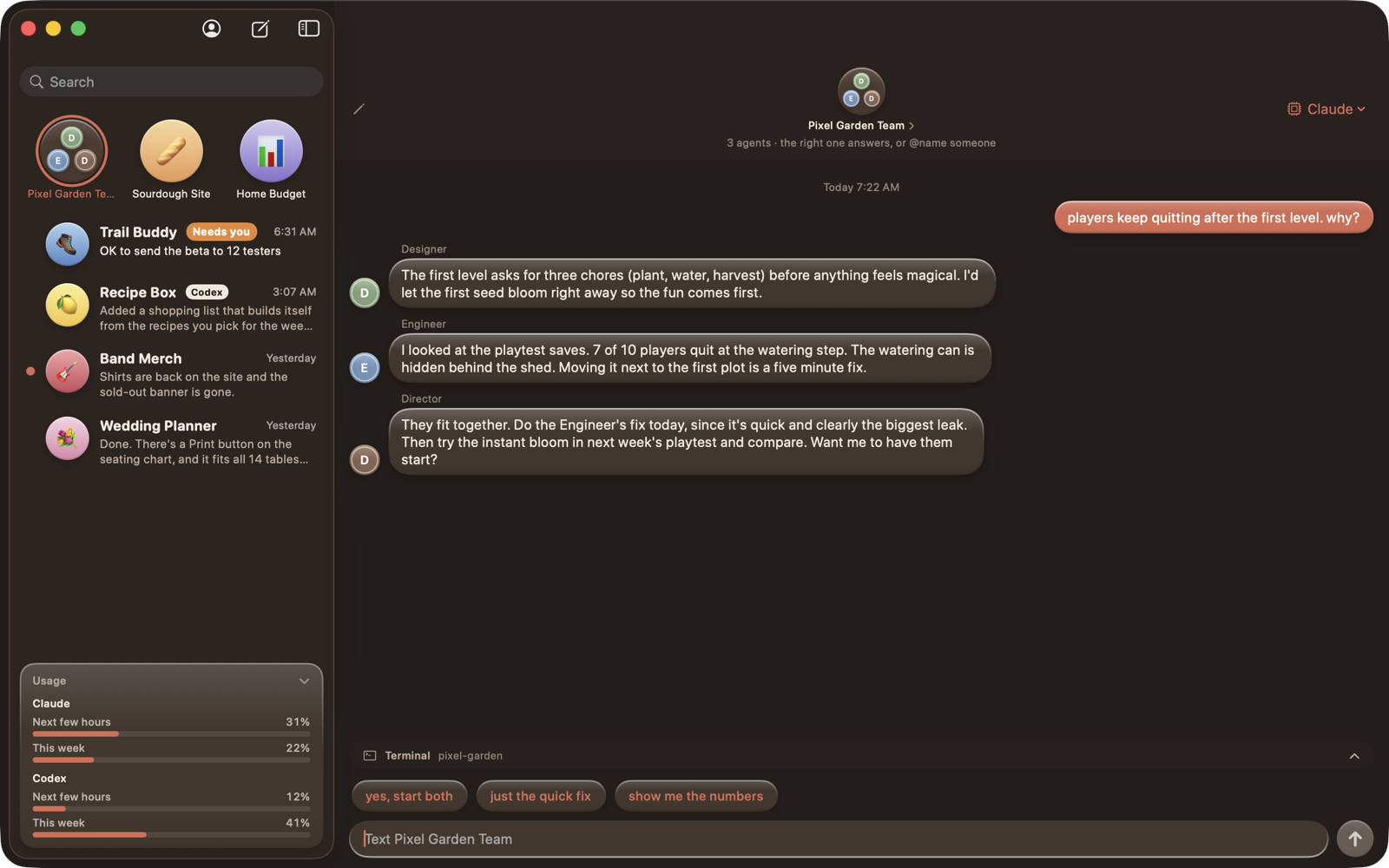
Drag one chat onto another. Text the group and the right agent picks it up, or @name someone. They can even talk to each other.

๐ŸŽฌ

Call in the team

One tap adds a Director, Designer, Engineer and friends to a project, each with its own chat and its own opinion.

๐Ÿ””

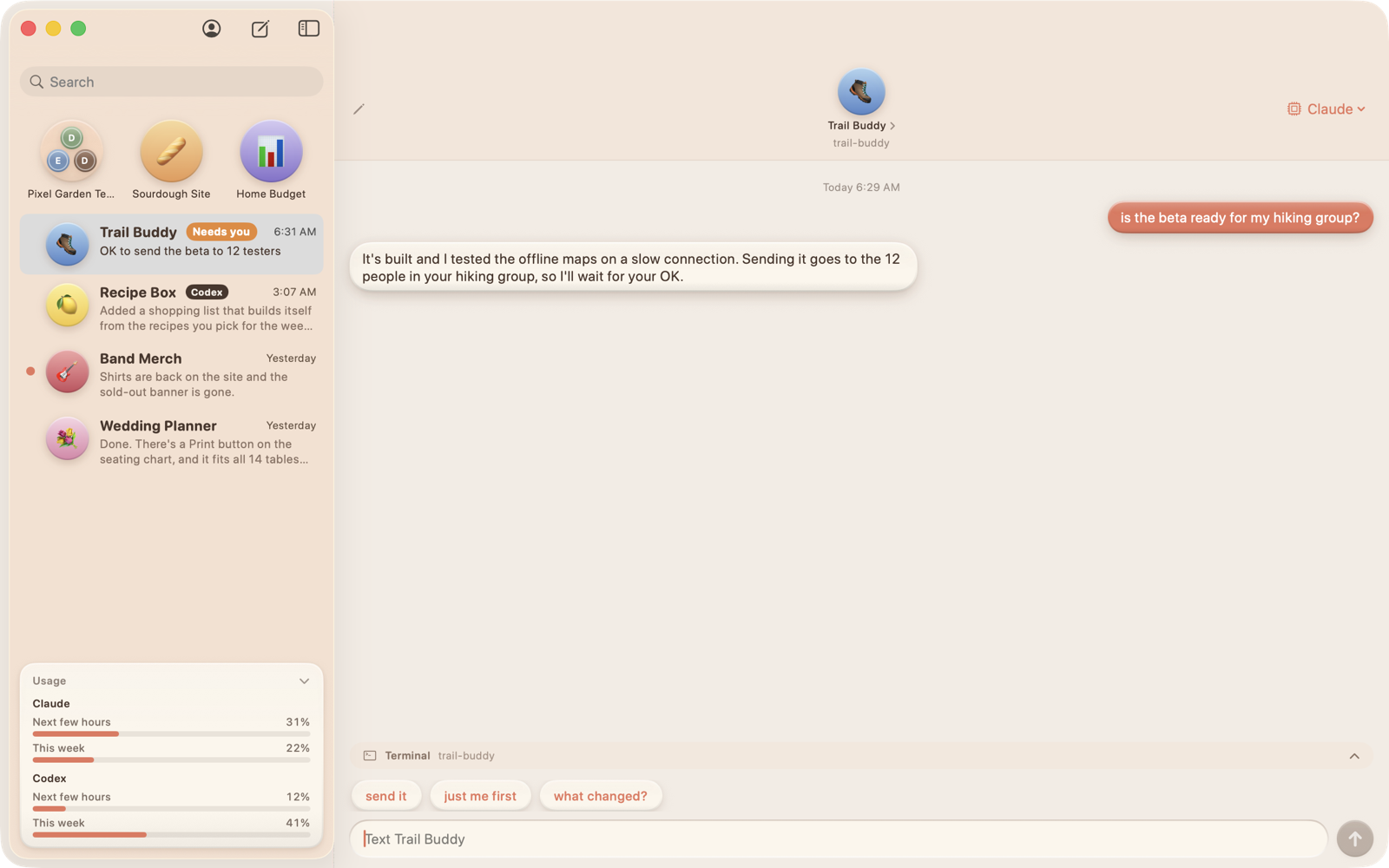
"Needs you"

When an agent is waiting on your decision, the chat gets flagged and the Dock icon shows a count. Nothing slips.

๐Ÿ–ผ๏ธ

Pictures and video

Drop a screenshot in. Get a picture or a video back. Agents can show you what they made, right in the bubble.

๐Ÿ“ฑ

iPhone and iPad SOON

Link your phone and keep texting your projects from the couch. Your Mac stays the brain; the phone is a remote. Phone app coming.

๐Ÿ“Š

Usage meter

See how much of your Claude and Codex limits you've used, for the next few hours and the week, and when they refill.

๐Ÿ”

Show the work

Curious? Fold open any reply to see every step the agent took. Close it and it's plain English again.

A group chat in dark mode with three specialists answering
Three specialists in one group, dark mode
A chat flagged because the agent is waiting on a decision
An agent waiting on you gets flagged

Good to know

What do I need?

A Mac on macOS 14 or newer, or a PC on Windows 10 or 11, and an account with at least one of Claude, OpenAI, Google or xAI. cChat's welcome screen installs the tool with its maker's official installer and opens their own sign-in. cChat never sees your login.

Does it cost anything?

cChat is free. It runs the agent tools you install and sign in to yourself, so usage counts against whichever plans you already have. Use one or all four.

Who makes it?

One person, as a side project. cChat isn't affiliated with Anthropic, OpenAI, Google or xAI. It just talks to the command-line tools they publish.

Where do my chats live?

On your own computer (Application Support on a Mac, AppData on Windows), backed up hourly. Nothing goes through a server of ours. There isn't one.

What works on Windows so far?

Chats with memory, group chats, next-step suggestions, "needs you" flags, pictures, project folders, the usage meter and Show the Work, with Claude Code or Codex. Gemini, Grok, pinning and phone linking are still Mac only. Bugs go in Issues.

Can agents break things?

By default an agent can edit files in its own project and nothing more. Anything riskier is blocked and shown as a gray note. A "Full access" switch exists per contact, off by default, with an orange warning.